Atmosly provides 23 add-ons that can be installed on your cluster to extend its functionality. Add-ons are managed through Helm charts and are versioned per Kubernetes version.
Recommended Add-ons
Atmosly recommends the following add-ons for a fully functional cluster:
PGL Stack (Prometheus + Grafana + Loki)
A complete observability stack for monitoring, visualization, and log aggregation. You can deploy the full stack or just the Prometheus metrics collector on its own:
- Prometheus is always installed — it is the core metrics engine (Prometheus + kube-state-metrics + recording rules) that powers cost optimization and right-sizing, and cannot be turned off.
- Grafana is optional — toggle it on to install Grafana dashboards (this also brings Alertmanager and Node Exporter, and requires the Hostname and Grafana credentials). Leave it off for a lightweight, Prometheus-only collector.
- Loki requires Grafana — it is surfaced as a Grafana datasource, so it is only available when Grafana is enabled. Turning Grafana off also disables Loki.
This is what lets Grafana and Prometheus be deployed independently: Prometheus can run without Grafana (metrics-only), while Grafana always builds on top of Prometheus.
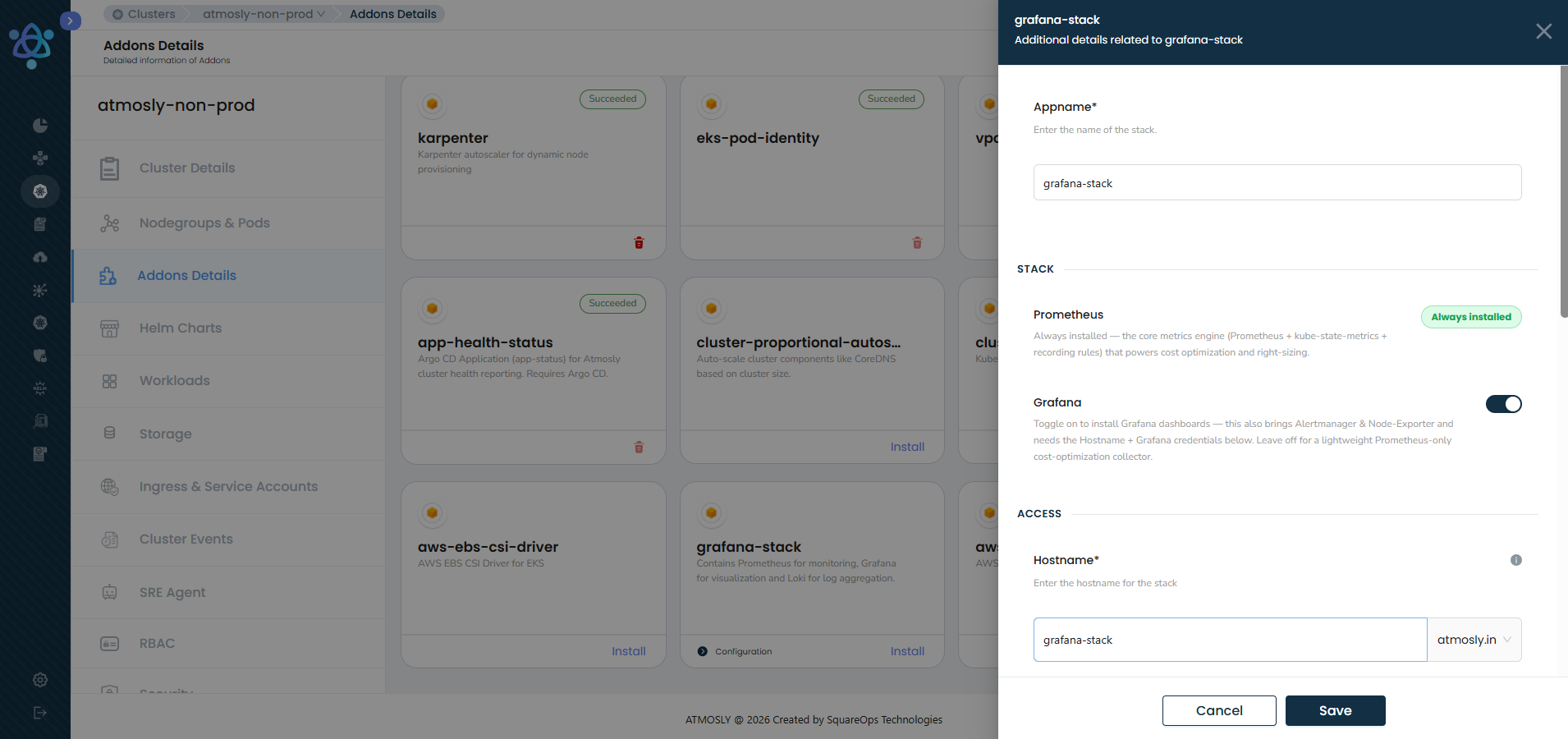
| Field | Description |
|---|
| Appname | Name of the stack. Default: pgl-stack |
| Hostname | Access hostname for the stack (required when Grafana is enabled). Default: pgl-stack |
| Grafana | Toggle to install Grafana dashboards (with Alertmanager & Node Exporter). Off = Prometheus-only collector. Default: Enabled |
| Loki | Toggle to enable Loki log aggregation. Requires Grafana. Default: Enabled |
| CloudWatch Collector | Toggle to enable CloudWatch metrics integration. Default: Disabled |
| Dashboard Refresh Interval | Grafana dashboard refresh frequency in seconds. Default: 30 |
| Object Expiration | Number of days after which S3 log objects expire. Default: 90 |
K8s Dashboard
Web-based UI for managing and monitoring your Kubernetes cluster.
| Field | Description |
|---|
| Hostname | Access hostname for the dashboard. Default: k8s-dashboard |
Complete Add-on Catalog
Networking & Ingress
| Add-on | Description | Cloud | Removable |
|---|
| NGINX Ingress Controller | Routes external HTTP/S traffic to Kubernetes services | All | No (once added) |
| Ingress ALB Controller | Manages AWS Application Load Balancers for traffic routing | AWS | No (once added) |
| VPC CNI | AWS VPC Container Network Interface for native pod networking | AWS | No (once added) |
| Istio Service Mesh | Service mesh for traffic management, security, and observability | All | Yes |
Certificates & Security
| Add-on | Description | Cloud | Removable |
|---|
| Cert Manager | Automates TLS certificate management and issuance | All | No (once added) |
| Cert Manager LE Email | Let's Encrypt email configuration for Cert Manager | All | No (once added) |
| Letsencrypt HTTP Issuers | HTTP-01 challenge issuers for Let's Encrypt | All | No (once added) |
| External Secrets | Syncs secrets from external managers (AWS Secrets Manager, GCP Secret Manager) | All | Yes |
Observability & Monitoring
| Add-on | Description | Cloud | Removable |
|---|
| PGL Stack | Prometheus + Grafana + Loki for full-stack observability | All | Yes |
| K8s Dashboard | Web interface for cluster management and monitoring | All | Yes |
| Metrics Server | Exposes resource metrics (CPU/memory) for HPA and kubectl top | All | No (once added) |
| Service Monitor CRD | Prometheus ServiceMonitor custom resource definitions | All | No (once added) |
| HPA for CoreDNS | Horizontal Pod Autoscaler for CoreDNS scaling | All | No (once added) |
Auto-scaling
| Add-on | Description | Cloud | Removable |
|---|
| Karpenter | Just-in-time node provisioning based on workload demands | AWS | No (once added) |
| Cluster Autoscaler | Adjusts cluster node count based on pending pod resource requests | All | No (once added) |
| Cluster Proportional Autoscaler | Scales workloads proportionally to cluster size | All | No (once added) |
| Keda | Event-driven autoscaling (scale on queue length, HTTP traffic, cron, etc.) | All | Yes |
Storage
| Add-on | Description | Cloud | Removable |
|---|
| EFS Storage Class | AWS Elastic File System integration for shared persistent storage | AWS | No (once added) |
| EBS CSI Driver | AWS Elastic Block Store driver for block storage volumes | AWS | No (once added) |
| Single AZ GP3 SC | GP3 storage class limited to a single availability zone | AWS | No (once added) |
CI/CD & Workflow
| Add-on | Description | Cloud | Removable |
|---|
| ArgoFlow | Argo Workflows for CI pipeline execution on the cluster | All | Yes |
Node Management
| Add-on | Description | Cloud | Removable |
|---|
| AWS Node Termination Handler | Gracefully handles EC2 spot interruptions and scheduled maintenance | AWS | No (once added) |
| Reloader | Automatically restarts pods when their ConfigMaps or Secrets are updated | All | Yes |
Add-on Status
| Status | Description |
|---|
| Deploying | Add-on installation is in progress |
| Active | Add-on is installed and running |
| Updating | Add-on is being updated to a new configuration or version |
| Destroying | Add-on is being removed from the cluster |
| Failed | The operation (installation, update, or removal) has failed |
Notes
- Add-on availability is filtered by your cluster's cloud provider and Kubernetes version.
- Some add-ons have dependencies on other add-ons (e.g., Service Monitor CRD depends on Prometheus). Dependencies are automatically resolved during installation.
- Add-ons marked as "No (once added)" in the Removable column cannot be removed after installation. Plan your add-on selection carefully.
- Each add-on version is tied to a specific Kubernetes version. When upgrading your cluster, add-on versions may also be updated automatically.
- Some add-ons are pre-selected during cluster creation but can be deselected.