Cloud Resources Overview
Cloud Resources lets you provision and manage individual cloud services — databases, buckets, queues, caches, and more — directly from Atmosly, alongside your clusters and applications. You can create brand-new resources from scratch, onboard resources that already exist, apply governance policies, and track cost and configuration drift, all from one place.
Governance is handled by the companion Policy Engine, which evaluates every provision, update, and import against the rules your team defines.
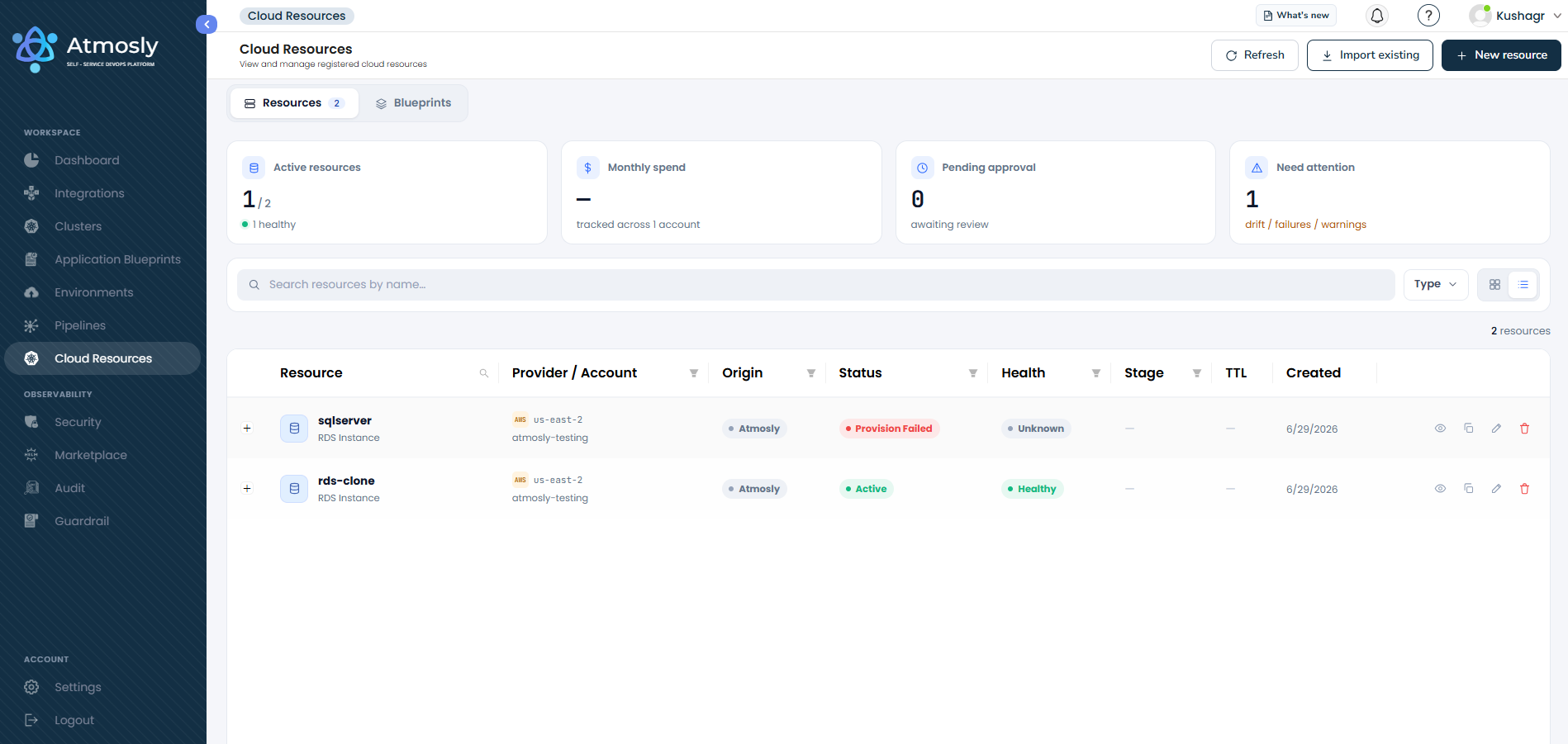
Navigating to Cloud Resources
Cloud Resources is a top-level item in the left navigation menu. Opening it shows two tabs:
| Tab | What it contains |
|---|---|
| Resources | The list of all provisioned and imported cloud resources, with status, health, and estimated monthly cost. This is the default view. |
| Blueprints | Reusable provisioning templates your team can publish and consume. See Blueprints. |
Access to Cloud Resources and the Policy Engine requires the View Cloud Resource permission. If you don't see these items, ask your organization admin to enable the permission for your role.
Supported Providers
| Provider | Resources |
|---|---|
| AWS | Databases, storage, messaging, compute, networking, and more (see below) |
| GCP | Storage, databases, messaging, secrets, cache, and serverless |
Supported Resource Types
AWS
| Resource Type | Service |
|---|---|
| S3 Bucket | Object storage |
| RDS Instance | Managed relational database |
| Aurora Cluster | Aurora relational database cluster |
| DynamoDB Table | NoSQL table |
| DocumentDB Cluster | MongoDB-compatible document database |
| ElastiCache Cluster | In-memory cache (Valkey / Redis / Memcached) |
| OpenSearch Domain | Search and analytics |
| SQS Queue | Managed message queue |
| SNS Topic | Pub/sub notifications |
| EventBridge Event Bus | Event routing |
| Lambda Function | Serverless functions |
| EC2 Instance | Virtual machine |
| Application / Network Load Balancer | Load balancing |
| Route 53 Hosted Zone | DNS |
| ECR Repository | Container image registry |
| Secrets Manager Secret | Secret storage |
GCP
| Resource Type | Service |
|---|---|
| GCS Bucket | Object storage |
| Cloud SQL Instance | Managed relational database |
| Memorystore (Redis) | In-memory cache |
| Pub/Sub Topic | Messaging |
| Cloud Run Service | Serverless containers |
| Secret Manager Secret | Secret storage |
Resource Status
Each resource moves through a lifecycle. The status you'll see in the list and on the detail page includes:
| Status | Meaning |
|---|---|
| Pending Approval | A create/update/delete request is waiting for policy-required approval |
| Provisioning | The resource is being created in your cloud account |
| Active | The resource is live and healthy |
| Update in Progress | A configuration change is being applied |
| Deleting | The resource is being removed from your cloud account |
| Drift Detected | The resource's live configuration no longer matches what Atmosly recorded |
| Provision / Update / Delete Failed | The operation failed — review the details and retry |
| Rejected | An approval request was declined |
| Out of Sync | Atmosly can no longer reconcile the resource with your cloud account |
Resources also carry a health indicator — healthy, drift, unreachable, or unknown — which Atmosly refreshes periodically in the background.
What's Next
- Provisioning & Managing Resources — create, import, cost estimates, blueprints, and lifecycle actions
- Policy Engine — govern provisioning with policies
Cloud Resources is a separate feature from Guardrails (which governs Kubernetes cluster actions) and from Application Blueprints (which are application-deployment templates). The Blueprints tab inside Cloud Resources refers specifically to cloud-resource provisioning templates.